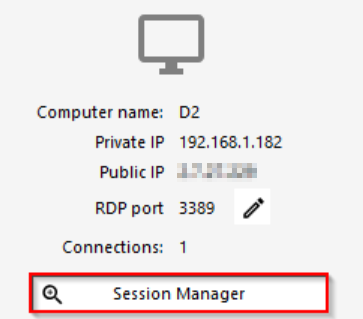
You will be able to shadow / control remote sessions by using the session manager located in the AdminTool\HOME tile instead of the task manager.
If you wish to remove the consent for shadowing a session you can use this group policy :
- Open Group Policy Editor (Gpedit.msc) on the server that is running TSplus.
- Under Computer Configuration\Administrative Templates\Windows Components\Remote Desktop Services\Remote Desktop Session Host\Connections.
- Right-click "Set rules for remote control of Remote Desktop Services user sessions", and then click Properties.
- Select the Enabled option.
- Under Options, click "Full Control without user's permission".
- Click OK, and then quit Group Policy Editor.
To update the local policy immediately afterward, go to a command prompt and run the following command :
gpupdate /force
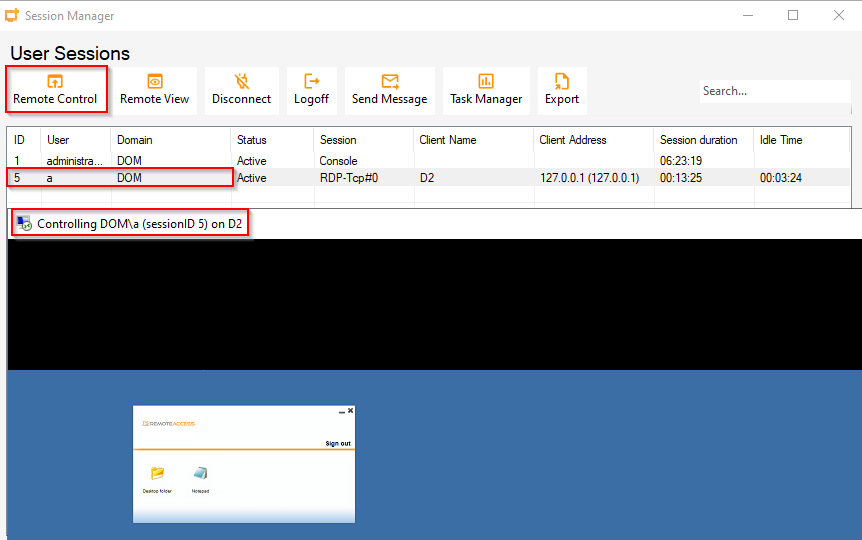
Now that the domain/local policy allows administrators to shadow/take control of users remote sessions, the administrator can start shadowing/taking control of the wanted remote session from the AdminTool\SESSION MANAGER menu without need for the user's consent :